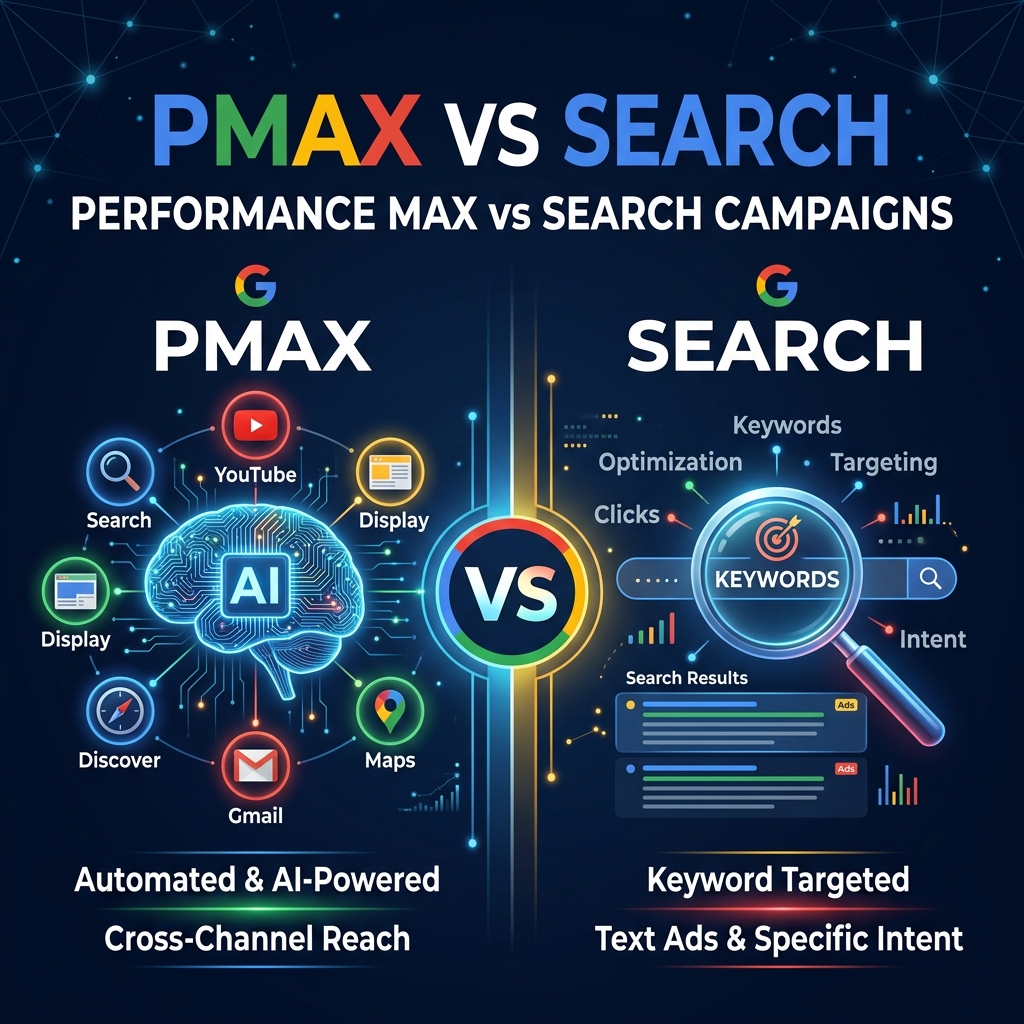
The biggest debate in Google Ads right now: should you run Performance Max (PMax) or stick with traditional Search campaigns? The answer isn’t one or the other — it depends on your business type, budget, data maturity, and goals.
At Grothify’s Google Ads management, we’ve run both campaign types across 100+ accounts and seen up to 908% ROAS. This guide breaks down exactly when to use each, their strengths and weaknesses, and how to combine them for maximum returns.
Not Sure Which Campaign Type Is Right?
Get a free Google Ads audit. We’ll analyze your account and recommend the optimal campaign structure.
What Is a Search Campaign?
Search campaigns are the original Google Ads format. Your text ads appear at the top of Google search results when someone types a specific keyword. You choose the keywords, write the ads, set bids, and control exactly where your ads show.
Key characteristics:
- You select exact keywords to target
- Ads appear only on Google Search (and Search Partners if enabled)
- Full control over bidding, ad copy, and negative keywords
- Highly transparent — you see exactly which search terms triggered your ads
- Best for capturing high-intent, bottom-of-funnel traffic
What Is Performance Max (PMax)?
Performance Max is Google’s AI-powered campaign type launched in 2022. It runs your ads across all Google channels simultaneously — Search, Display, YouTube, Gmail, Discover, and Maps — using machine learning to optimize for conversions.
Key characteristics:
- Google’s AI decides which channels, audiences, and creatives perform best
- You provide “asset groups” — headlines, descriptions, images, videos
- Limited visibility into which channels or search terms drive results
- Requires conversion tracking and ideally 30+ conversions/month for optimal learning
- Best for e-commerce, lead gen at scale, and multi-channel reach
Head-to-Head Comparison
| Factor | Search Campaigns | Performance Max |
|---|---|---|
| Control | Full keyword, bid, and placement control | Limited — Google’s AI decides |
| Transparency | Full search term reports | Limited search term visibility |
| Channels | Google Search only | All Google channels (Search, Display, YouTube, etc.) |
| Best For | High-intent keywords, B2B, services | E-commerce, lead gen at scale |
| Learning Period | 1–2 weeks | 4–6 weeks (needs 30+ conversions) |
| Budget Minimum | ₹500–1,000/day works | ₹1,500–3,000/day recommended |
| Negative Keywords | Full support | Account-level only (limited) |
| Creative Needs | Text ads only | Text + images + videos needed |
| ROAS Potential | High for targeted campaigns | Very high at scale with data |
When to Use Search Campaigns
Choose Search campaigns when:
- You’re a service business — people search for “SEO agency near me” or “plumber in Delhi” with clear intent
- You have a small budget — under ₹50,000/month, Search gives tighter control over spend
- You need keyword-level control — B2B businesses targeting specific long-tail terms
- You’re launching a new account — Search builds conversion data that PMax can later leverage
- You want full transparency — see exactly what searches trigger your ads and at what cost
Want to maximize your Search campaign ROI? Read our guide on how to reduce Google Ads CPC by 40%.
When to Use Performance Max
Choose PMax when:
- You’re running e-commerce — PMax with a product feed (Shopping) is extremely powerful
- You have 30+ conversions/month — the AI needs data to optimize effectively
- You want multi-channel reach — one campaign across Search, YouTube, Display, and Gmail
- You have creative assets ready — images, videos, and multiple headline/description variations
- Budget exceeds ₹1.5L/month — PMax performs best with sufficient budget for learning
The Grothify Strategy: Combine Both
At Grothify, we rarely run just one campaign type. Our proven framework:
- Start with Search — launch targeted Search campaigns to build conversion data and identify high-performing keywords
- Add PMax after 30+ conversions — use the conversion data to power PMax’s AI learning
- Protect branded terms — keep a separate branded Search campaign so PMax doesn’t cannibalize cheap brand clicks
- Use account-level negative keywords — prevent PMax from bidding on irrelevant queries
- Monitor and rebalance — shift budget toward whichever campaign type delivers better CPA/ROAS weekly
Real Results: PMax + Search Combined
| Account | Strategy | Result |
|---|---|---|
| E-Commerce (South Africa) | PMax with Shopping feed + branded Search | 908% ROAS, 383 conversions |
| Lead Gen (India) | Search-only for high-intent keywords | 143 qualified leads, efficient CPA |
| Brand Launch | PMax for awareness + Search for conversions | 394K impressions, 6.7K clicks |
5 Common PMax Mistakes to Avoid
- Launching with zero conversion data — PMax needs historical conversion data or at least 2 weeks of Search campaign data first
- Not using negative keywords — add account-level negatives to block irrelevant traffic
- Poor asset groups — weak images or only 3 headlines cripple PMax performance. Provide 15 headlines, 4 descriptions, 5+ images
- Setting target ROAS too aggressively — start with Maximize Conversions, then layer in target ROAS after the learning period
- Ignoring URL expansion — PMax can send traffic to ANY page on your site. Disable URL expansion or use URL exclusions to control this
PMax vs Search: Decision Framework
| Your Situation | Recommended Campaign |
|---|---|
| New Google Ads account, limited budget | Search only |
| E-commerce with product feed | PMax + branded Search |
| B2B lead generation | Search primary, PMax secondary |
| Local service business | Search + Local campaigns |
| Large budget, 50+ conversions/month | PMax primary + Search protection |
| Brand awareness campaign | PMax (broad reach across channels) |
Get Expert Google Ads Management
Grothify builds the optimal Search + PMax campaign structure for your business. 5–9x ROAS average.
Frequently Asked Questions
Is Performance Max better than Search campaigns?
Neither is universally better. PMax excels at scale with sufficient data (30+ conversions/month) and multi-channel reach, especially for e-commerce. Search excels at targeting high-intent keywords with full control and transparency. The best strategy uses both together.
Can PMax and Search campaigns run together?
Yes — and they should. Google gives Search campaigns priority for exact-match keywords. Keep a branded Search campaign running alongside PMax to protect cheap brand traffic and maintain keyword-level control for your highest-converting terms.
How much budget does Performance Max need?
PMax needs sufficient budget for its AI to learn. We recommend ₹1,500–3,000/day minimum (₹45K–90K/month). Below this, the algorithm doesn’t get enough data to optimize effectively. For accounts under ₹50K/month, Search campaigns are usually more efficient.
Why can’t I see search terms in PMax?
Google provides limited search term visibility in PMax by design — it’s an AI-driven campaign. You can see top search categories and some individual terms in the Insights tab, but not the full search term report you get with Search campaigns. Use account-level negative keywords to block unwanted terms.
Should I start with PMax or Search for a new account?
Always start with Search. Build 2–4 weeks of conversion data first, then launch PMax using that data. Starting with PMax on a brand-new account with zero conversion history leads to poor AI decisions and wasted budget.
Written by Mohammed Ouzair, Google Ads Certified Specialist at Grothify. Part of our Google Ads management services. Follow on Instagram and LinkedIn.